AccountCraft Journal
App Integrations for Shopify Accounts: What Works in 2026
How apps connect to Shopify New Customer Accounts: what they can add, how to install and place blocks, and how to handle consent and data permissions.

Apps connect to Shopify’s New Customer Accounts through customer account UI extensions: blocks and pages that appear inside the account area your customers already log into. You install the app, place its blocks in the editor, and customers see them without any theme edits. If you want editable customer fields, a wishlist and consent controls in one place, we built AccountCraft for exactly that, and you can install it free from the Shopify App Store.
This guide covers what apps can add to New Customer Accounts, how to set one up step by step, and which permissions and privacy points to check first.
TL;DR
- Apps plug into New Customer Accounts as blocks (placed by you in the editor) or as full pages (added to the account menu).
- Install from the App Store, then go to Settings > Checkout > Edit to place blocks. No theme code is involved.
- Check the access scopes an app requests and whether it touches protected customer data before you approve it.
- Consent changes go through Shopify’s Customer Privacy API. Compliance remains your responsibility as the merchant.
- AccountCraft has a free plan; Pro and Plus are billed through Shopify.
Table of Contents
- What an app can add to customer accounts
- How to connect an app to New Customer Accounts
- Fields, data and personalization
- Consent and personal data
- Permissions to review before you approve
- App, native or custom build
- Start with AccountCraft
- Our perspective
- FAQ
- Sources
What an app can add to customer accounts
Shopify’s developer documentation on customer accounts says apps can extend three areas: the Order index page, the Order status page and the Profile page. They can also create entirely new full pages for things like wishlists, subscriptions, rewards and offers. Typical uses are order actions such as returns or reviews, loyalty balances, and membership levels shown on the profile.
Shopify’s December 2024 changelog describes the goal: customers take self-serve actions such as managing subscriptions, triggering returns, or updating personal information behind a single passwordless login.
There are three kinds of placement, according to the customer account UI extensions reference:
- Block: you place it yourself in the checkout and accounts editor.
- Full page: a custom route that can be added to the account menu (order-specific pages excepted).
- Static: fixed locations tied to a page feature.
You can add up to three extensions to the same block location.
Shopify’s Help Center also maps common needs to solutions: custom fields, personalized content, order editing, returns, subscriptions, reordering and tracking. App categories include loyalty, referrals, wishlists, reviews, surveys, preorders and warranties, as listed on its customization options page. Merchants moving off legacy customer accounts will find that page a useful checklist of what to rebuild.
How to connect an app to New Customer Accounts
The steps below follow Shopify’s checkout apps guide.
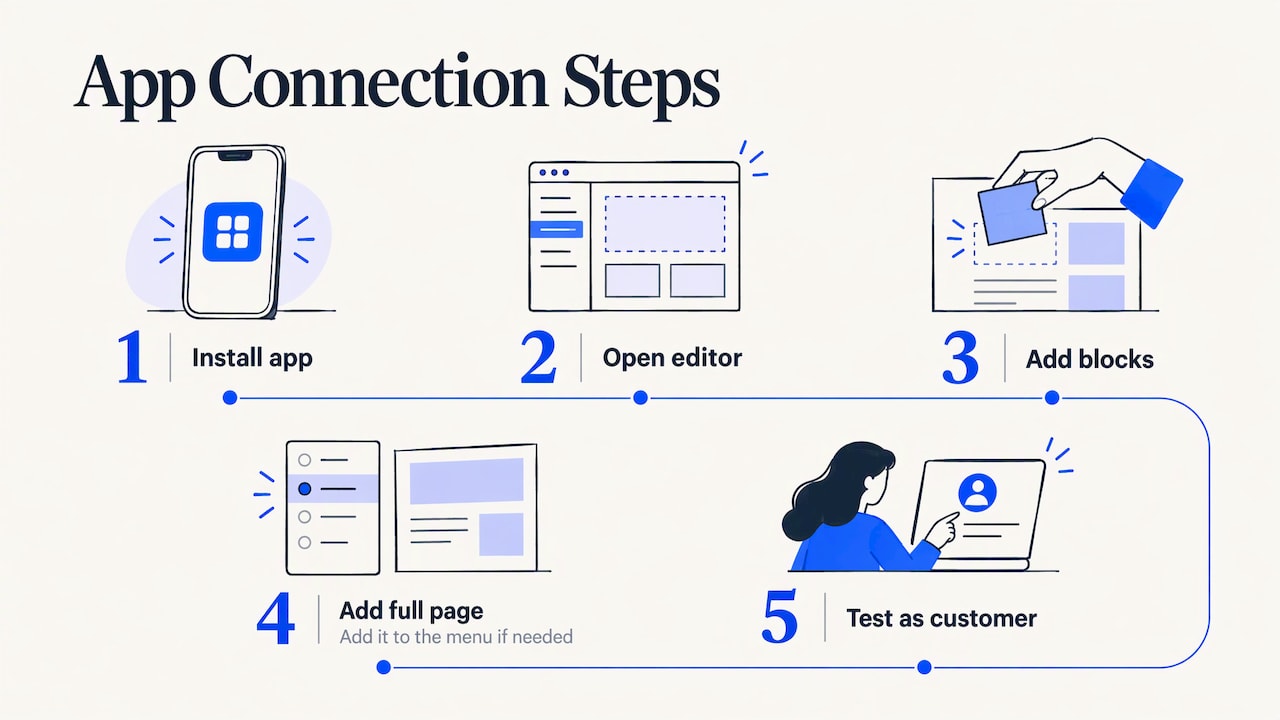
1. Install the app
In the Shopify App Store, search for the app, filter by “Customizes checkout” if you are browsing, click Add app, then Install app. Before you approve, read the permissions screen. We cover that in the next section.
2. Open the editor
In your Shopify admin, go to Settings > Checkout and click Edit. Switch to the customer accounts pages (Order index, Order status, Profile or a new page).
3. Add the blocks
Use the Sections or Apps sidebar to add the app’s blocks to the page. Each block has its own settings defined by the app developer. A highlighted area holds a maximum of three apps, so plan placement if you run several.
4. Add a full page to the menu if needed
Apps that offer a full page, such as a wishlist, can be added to the customer account menu from the same editor.
5. Test as a customer
Sign in to your store with a test customer and walk through the account. Customers reach their account from the online store or order notification emails, per Shopify’s docs, and the pre-authenticated Order status page prompts a login if they navigate elsewhere.
Where AccountCraft fits in these steps
AccountCraft uses official Shopify Customer Account UI Extensions, so it follows this same path with no code or theme changes. Its Block Builder offers 14 block types: text, banner, button, card, update form, single field, record list, SMS consent, privacy consent, wishlist, image, video, spacer and divider. Customer fields are bound to customer metafields, so the data stays in Shopify and there is no separate customer database.
For a deeper walkthrough, see our guide on customizing Shopify accounts with New Customer Accounts and the notes on adding and testing account widgets.
Fields, data and personalization
Out of the box, customers can edit their name, email and addresses on the Profile page after signing in. Anything beyond that, such as pet names, vehicle details or communication preferences, needs custom fields. Shopify says these are collected only after sign-in, on a dedicated form or on the Profile page, and written to metafields (see the Help Center page).
With AccountCraft you build this visually:
- An update form or single field block binds to a customer metafield.
- A record list handles repeatable entries, for example several pets or vehicles per customer.
- Conditional rendering shows a block only to certain customers, based on customer tag, metafield, market, B2B status or account age.
- Translations let the same account page speak your customers’ languages.
Our custom fields guide goes through the no-code route first and the API details after it.
Consent and personal data
Consent is where account integrations matter most for stores selling to customers in the EU or UK. Shopify’s capabilities documentation explains the mechanics: an extension needs the collect_buyer_consent capability to change a customer’s tracking consent, while reading the consent state does not require it. Shopify tracks analytics, marketing, preferences and data-sale choices and applies updates across its managed services.
AccountCraft’s SMS consent and privacy consent blocks are linked to Shopify’s customer privacy APIs. They help you collect, record and honor customer consent through Shopify, and customers can see and change their choices in their account. Compliance remains your responsibility as the merchant, and questions about what the law requires of your store belong with your own legal adviser.
Two more facts help you judge any app:
- Shopify says customer account UI extensions run in isolated sandboxes without access to sensitive payment information.
- Shopify’s privacy requirements require every app to link a privacy policy from its App Store listing.
Permissions to review before you approve
When you install, you approve the app’s access scopes. Shopify’s access scopes documentation lists the customer scopes and explains that you can check which ones an installation has been granted.
Also know what counts as protected customer data. Shopify’s protected customer data page says it includes names, addresses, email and phone, and public apps that access these fields must go through review. Shopify’s API terms add that public apps must sync applicable customer data they collect back to the merchant’s store admin.
A short checklist before installing:
- Which scopes does the app request, and does each match a feature you will use?
- Where is customer data stored? With AccountCraft it stays in Shopify metafields.
- Does the listing link a privacy policy?
- Does the app use official Shopify extensions rather than theme edits?
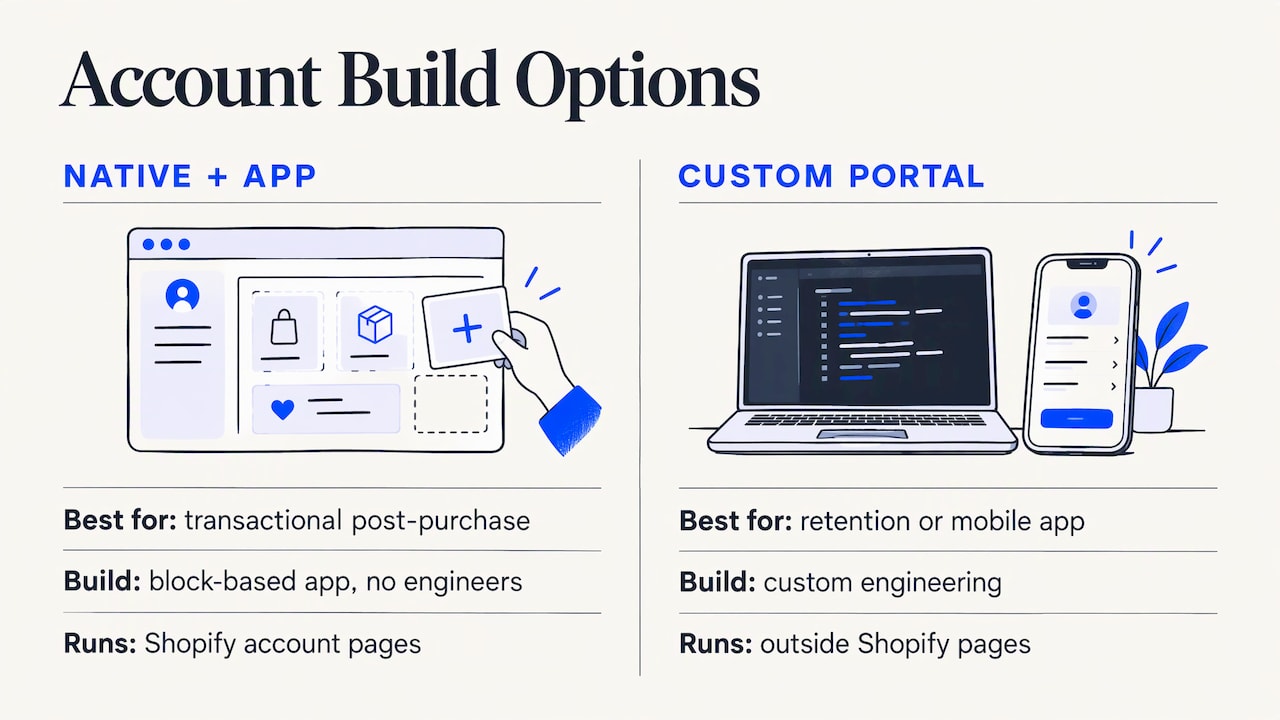
App, native or custom build
Nebulab’s portal guide argues that native accounts with UI extensions suit most brands with transactional post-purchase activity. A fully custom portal, authenticating through the Customer Account API, is justified when retention runs through the account page or a mobile app is planned. That API authenticates buyers rather than apps, so it fits portals built outside Shopify’s pages.
Most merchants who want custom fields, a wishlist and consent blocks do not need that. A block-based app covers them without engineers. If you do need custom engineering later, an overview of technical capabilities a Shopify store may need helps you scope it, and a comparison of Shopify versus Squarespace with local help shows how small businesses weigh outside support.
For comparisons of our category, see our posts on customer account extensions, the best customer portals for Shopify and whether Shopify apps work with New Customer Accounts.
Start with AccountCraft
AccountCraft gives you a visual Block Builder for New Customer Accounts: editable customer fields, repeatable lists, a built-in wishlist, conditional visibility, translations and consent blocks, all using official Shopify extensions. There is a free plan, and the paid plans (Pro and Plus) are billed through Shopify. See the App Store listing for current pricing.

Install AccountCraft free from the Shopify App Store, or see the plans on accountcraft.app.
Our perspective
Most account projects stall for one reason: the merchant wants a field or a wishlist on the account page and assumes it means a developer and a theme change. It does not. New Customer Accounts were built to be extended through official extensions, so the right integration is the one that stays inside that system.
That is why we keep customer data in Shopify and bind fields to customer metafields. Your segments, flows and reports keep working from the same data customers edit themselves. Consent blocks follow the same logic: the choice a customer makes is recorded through Shopify’s own privacy APIs.
Start with the blocks you will use this week, a profile form and a consent block, then add more as you see how customers use them.
Ivan Signorile
FAQ
Do I need to code to add an app to customer accounts?
No. You install the app, then go to Settings > Checkout > Edit and add its blocks in the editor. Developers only write code when building custom extensions.
Can I use more than one app on the same page?
Yes. Shopify allows up to three extensions in the same block location, and you can place different apps in different areas of the account pages.
Does AccountCraft store my customers’ data?
No separate database exists. Customer data stays in Shopify, and fields are bound to customer metafields.
Does an app make my store GDPR compliant?
No app can do that for you. AccountCraft helps you collect, record and honor consent through Shopify’s customer privacy APIs, while compliance stays your responsibility.
Sources
- Building apps for customer accounts, Shopify
- Extend Customer Accounts with Apps, Shopify Changelog
- Customer account UI extensions, Shopify
- Customization options for upgrading customer accounts, Shopify Help Center
- Customizing your checkout and accounts, Shopify Help Center
- Enable extension capabilities for customer accounts, Shopify
- Privacy requirements, Shopify
- Shopify API access scopes
- Work with protected customer data, Shopify
- Shopify API License and Terms of Use
- GraphQL Customer Account API, Shopify
- Standard vs. Custom Account Portals in Shopify, Nebulab